Compliance Reporting steps
Whether you are using SparkReach or doing it by hand, here are some of the steps to remember:
Before you start: This walkthrough reflects Kansas campaign finance requirements as of July 2026. Required donor fields, report formats, and filing deadlines vary from state to state and change over time, so confirm the current rules with your own filing authority before you submit.
Find all of your contributions
Start with an export from your donation system. If you are using SparkReach for your donation system, then your donations already have the correct information for your contribution report. If you are using ActBlue, you need to go to Downloads > Contributions over a specified time period > Pick the date > download, then you can upload it into SparkReach. If you are using NGP, go to Contribution Report > Pick the date range > Refresh > Export as .CSV
If you already have some donations in SparkReach, it’s OK to upload them again. The system will check for duplicates.
You also need lists of offline donations like checks. If you have been logging deposits in SparkReach as you go, then you will already have them. If not, then check your records or look at your bank account for every deposit and figure out who it was from.
Remember that you need to log the person or organization appropriately so that you can track the information that you need for them.
If you have this all already in a Google Sheet or Excel, you can import it into SparkReach. Export it as a CSV and go to Contacts > Import and it will pull in the contact and donation information at the same time.
Check for duplicates
Next, scan your data for duplicates and missing data.
For instance, you might have a donation from both John and Johnny with the same email address. You should merge those so that they are one contact.
In SparkReach, you would do this with the Contacts > Merge Duplicates and it will give you a list of different combinations of name, email, and phone to review and possibly merge.
Make sure that you have each contact once so that your reporting will be clean!
Find missing compliance information and fix
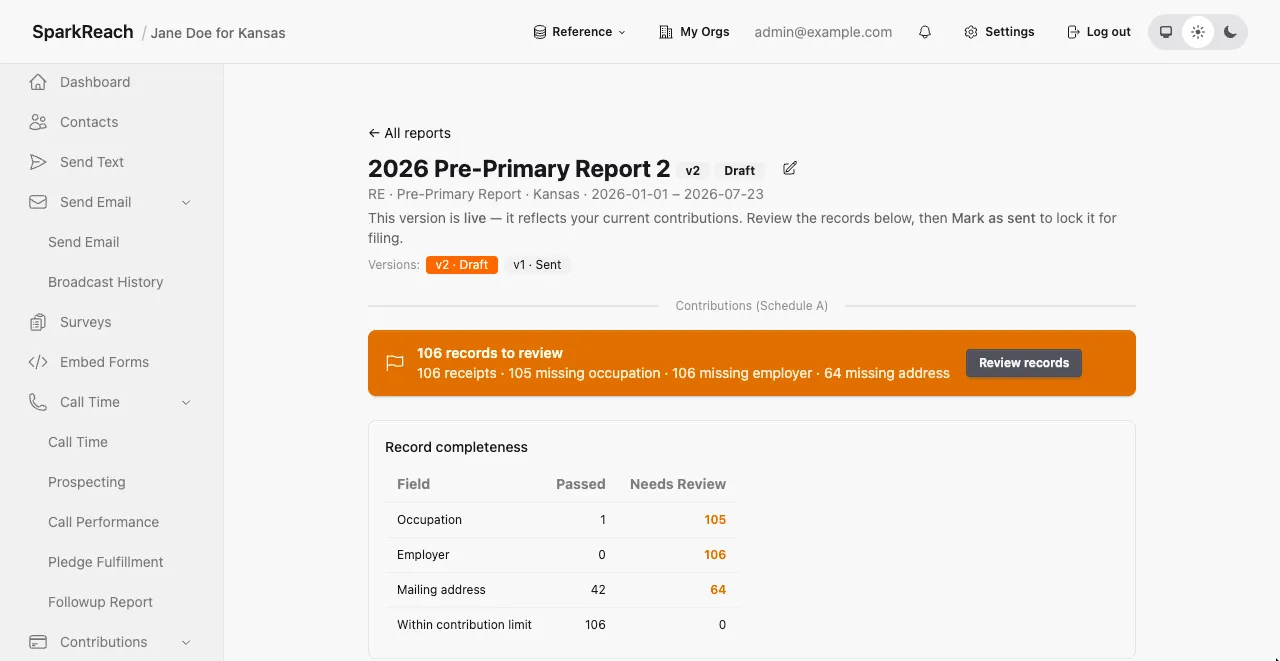
Next, go through each contact and find what compliance information you are missing. For instance, if you do not have a donor’s occupation, then you need to contact them to get it and fill it in.
In SparkReach, once you start a compliance report, you will get a list of contacts that do not have all of the required information. Click through to the contact from that list to update the information.
Export for filing
Once you are done with the data cleaning, then you need to put the information into the report. SparkReach supports a PDF export option that you can put into your report.
We know this feels a bit daunting, so we hope this helps whether you choose to use SparkReach or not.
Finally, thank you for putting your name on the ballot. We appreciate that you’re out there talking to voters and trying to make a difference.